
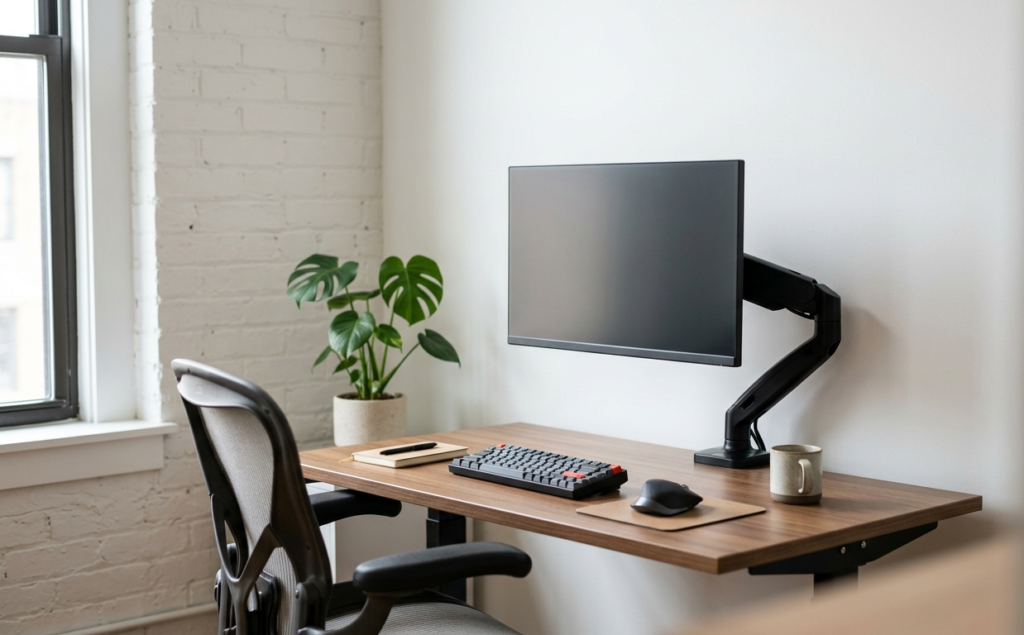
If you are working from a compact desk in a studio apartment, a shared home office, or a tucked-away bedroom corner, you know that desk real estate is the most valuable commodity you own. Every square inch occupied by a bulky monitor stand is an inch you can’t use for your keyboard, your notebooks, or even a much-needed cup of coffee. The default stands that come with most displays are notoriously intrusive, often featuring wide, flat bases or deep footprints that push your screen closer to your face than is comfortable or ergonomically sound.
Enter the monitor arm: the ultimate “space-saving” upgrade for the modern remote professional. By lifting your screen off the desk surface and securing it via a clamp or grommet hole, you essentially “levitate” your tech, opening up the entire area beneath the display. For users with small desks—those measuring 40 inches wide or less—this transition is more than just a stylistic choice; it is a functional necessity that can transform a cramped, stressful setup into a streamlined, high-performance workstation.
In this guide, we will explore the best monitor arms designed specifically for small desks and tight quarters. We’ll discuss the nuances of weight capacity, tilt range, and the critical concept of “depth management”—ensuring that the arm itself doesn’t stick out so far behind the desk that it prevents you from pushing your workspace against a wall. Whether you are a creative professional needing precise positioning or a casual user just looking to end “tech neck,” there is a mounting solution that fits your specific square footage.
Why Monitor Arms are Critical for Small Desks
The primary struggle with a small desk is the lack of depth. When a desk is shallow (often 24 inches or less), a traditional monitor stand sits right in the middle of your primary work zone. This forces your monitor to be closer than the recommended arm’s length, leading to eye strain and headaches. Furthermore, it forces you to cram your keyboard and mouse right against the edge of the desk, leaving no room for your wrists to rest comfortably.
By utilizing a monitor arm, you gain back that central “delta” of space. You can push the monitor further back, often even slightly beyond the edge of the desk if space allows, which improves your focal distance. More importantly, it allows you to raise the monitor to your natural eye level. Most stock stands are too low, causing users to hunch forward and round their shoulders. A quality arm ensures that your spine remains neutral, which is the cornerstone of ergonomic health.
Key Features to Look For in Compact Mounts
When shopping for a mount specifically intended for a smaller desk, not all arms are created equal. You need to consider several technical factors to ensure the arm doesn’t actually make your space feel more cluttered:
1. The Mount Style: Clamp vs. Grommet
Most small desks used in apartments are made of lightweight materials like MDF or honeycomb-structured wood. Before buying, check the thickness and durability of your desk edge. A C-clamp is the most common choice and requires no drilling, but if your desk has a decorative lip or is positioned flush against a wall, you might need a grommet mount, which requires a small hole through the desk surface but offers the most stability and a “zero-clearance” fit against walls.
2. Gas Spring vs. Mechanical Spring vs. Static
For small desks, gas spring (or “pneumatic”) arms are generally superior. They allow for “one-finger” adjustments. If you use your small desk for different tasks—say, sitting during the day and standing with a laptop riser in the afternoon—you want to be able to effortlessly move the monitor without loosening bolts. Static poles are cheaper but take up more vertical visual space and aren’t nearly as flexible in tight spots.
3. Depth and “Arm Elbow” Clearance
This is the most overlooked detail. Some monitor arms have long “elbows” that need to swing back behind the desk to position the monitor properly. If your desk is pushed up against a wall, these arms will hit the wall, forcing you to pull your desk several inches away from the wall. For a small room, that’s lost floor space. Look for “short-track” arms or designs that allow the elbows to stay within the footprint of the desk or move vertically rather than horizontally.
Maximizing Ergonomics in Limited Square Footage
Beyond just saving space, monitor arms are ergonomic tools. In a small apartment setup, you are often working in a less-than-ideal chair or at a desk that might be slightly too high. Being able to tilt the screen forward or backward (range of motion) is essential to combat glare from windows that you can’t easily move away from.
Rotation is another benefit. Many small-space workers, such as coders or writers, prefer a vertical (portrait) orientation for a secondary screen. A good monitor arm allows you to flip the orientation in seconds. This is a huge space-saver because a vertical 24-inch monitor takes up significantly less horizontal desk width than a landscape one, allowing you to fit a larger display onto a tiny 36-inch desk.
Common Installation Mistakes on Small Desks
The most common mistake is over-tightening the clamp on a thin desk. If you have a budget desk from a big-box retailer, the pressure of a heavy monitor arm can actually crush the internal structure of the desk. We recommend using a small “reinforcement plate” or even a simple piece of scrap wood between the clamp and the desk to distribute the weight.
Another mistake is poor cable management. On a small desk, wires are much more visible. Most high-quality monitor arms include integrated cable channels. Use them. By routing your power and HDMI cables through the arm and down the back of the desk, you remove the “visual noise” that makes a small space feel messy.
Comparing Single vs. Dual Mounts for Small Areas
It is a myth that you can’t have dual monitors on a small desk. In fact, a dual monitor arm is the only way to successfully run two screens on a 40-inch desk. However, you must be careful with the arm design. Many dual arms use a “crossbar” or wide-swinging limbs that require a lot of clearance. For small desks, look for dual arms that stack vertically or have very tight articulation points. This allows you to have the productivity of two screens without feeling like the tech is closing in on you.
Recommended Products
- VIVO Dual Monitor Desk Mount — Best for those who need to maximize productivity on a narrow desk; the heavy-duty C-clamp and grommet options provide a rock-solid foundation for two screens up to 27 inches, effectively doubling your digital workspace without taking up an extra inch of floor space. View on Amazon
- HUANUO Monitor Stand Riser — While not a traditional “arm,” this is the best alternative for renters with glass desks or desks that don’t allow for clamps; it provides ergonomic height adjustment and creates a storage cubby underneath for your keyboard, making it a perfect entry-level space-saver. View on Amazon
Conclusion
A small desk does not have to be a compromise on comfort or efficiency. By moving your monitor from a static stand to an adjustable arm, you reclaim the heart of your workspace. You gain the ability to sit with better posture, reduce eye fatigue, and maintain a cleaner, more organized environment. When you are working in a limited space, the goal is always to make the furniture work for you, rather than you working around the furniture. Investing in a high-quality monitor mount is perhaps the single most effective way to “size up” your office without moving to a bigger apartment. Focus on adjustable height, check your desk’s weight limits, and enjoy the newfound freedom of a floating screen.