
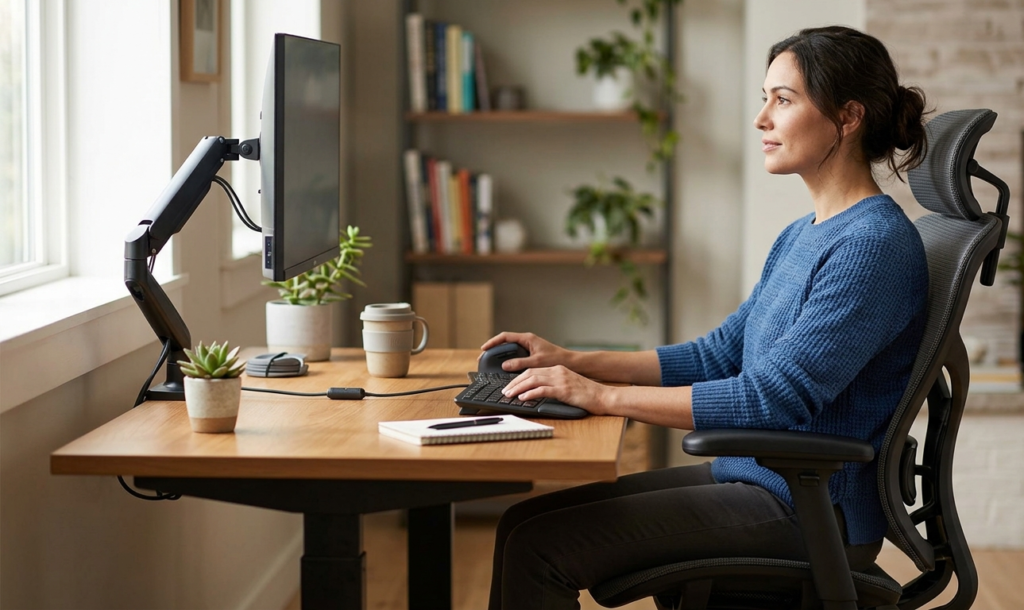
Back discomfort during the workday usually does not come from one dramatic mistake. It builds slowly: a chair that sits a little too low, a laptop that keeps your head tilted down, a lunch break spent in the same position you started the morning with. By the end of the day, those small habits can add up to stiffness that makes everything feel harder than it should.
The good news is that better back health during the workday does not require a perfect setup or a total office reset. In most cases, the biggest improvement comes from a handful of simple, repeatable habits. Small changes to how you sit, stand, reach, and move can make long desk days feel more manageable and a lot less punishing.
Start with a neutral sitting position
If there is one habit worth building first, it is learning how to settle into a neutral seated position. That means your feet are supported, your lower back is not slumped, and your shoulders are relaxed rather than pulled forward. It sounds basic, but many people spend hours sitting just slightly out of alignment without noticing it.
A neutral position is not about sitting stiffly. You do not need to hold yourself perfectly still all day. Instead, think of it as a comfortable default that gives your back less to compensate for. When your hips are level, your spine has a more natural shape, and the muscles along your back do not have to work as hard to keep you upright.
A few practical cues can help:
- Keep both feet flat on the floor or on a footrest.
- Sit all the way back in the chair so your lower back has support.
- Let your knees bend at a comfortable angle instead of reaching too high or too low.
- Avoid perching on the edge of the seat for long stretches unless you are intentionally changing posture.
If you work from a dining chair, apartment desk, or shared workspace, the setup may never feel perfect. That is fine. The goal is not perfection. It is reducing the amount of time your body spends in a position that works against you.
Raise the screen, not your neck
A common reason for end-of-day back tension is that the whole upper body starts chasing a screen that is too low. When you lean your head forward to see a laptop or monitor, the strain does not stay in your neck. It travels down through your shoulders and upper back too.
One of the simplest workday habits for better back health is keeping your screen at a height where you can look forward, not down. For many desk setups, that means using a monitor riser or a laptop stand so the top of the screen sits closer to eye level. You may still need to glance down occasionally, but your default position should feel open rather than folded.
This matters even more if you spend long hours on a laptop. A low screen can quietly train you into a rounded posture that feels normal until it becomes uncomfortable. Raising the screen is not a flashy fix, but it is one of the clearest ways to reduce the chain reaction that starts in the shoulders and settles into the back.
A simple setup rule: if your chin is tipping toward your chest to see your screen, the screen is probably too low.
Treat movement breaks like part of the job
Most people wait until they feel stiff before they move. By then, the back has already been in one position for too long. A better approach is to treat small movement breaks as part of the workday itself, not as a reward for finishing tasks.
You do not need a full workout between meetings. Even brief resets can help interrupt the kind of static sitting that makes your back feel locked up. Standing to refill water, walking to another room for a minute, or taking a quick stretch break before a video call can all make a difference.
The point is consistency, not intensity. A few simple movement cues help:
- Stand up once an hour if your schedule allows.
- Walk while taking one phone call a day.
- Use transitions between tasks as a reason to change position.
- Stretch lightly during natural pauses instead of waiting until discomfort builds.
If your work is highly focused or deadline-driven, movement breaks may feel inconvenient at first. But they usually save time in the long run because it is easier to keep working when your body is not distracted by tension.
Make your chair work with you
A chair does not have to be expensive to support better back health during the workday, but it should at least help you sit in a position that feels balanced. If your chair is too low, too deep, or missing basic lumbar support, your body will start making adjustments to compensate.
The simplest habit here is to check in with your chair before the day gets away from you. Ask yourself:
- Are my hips slightly higher than my knees, or am I sinking backward?
- Can I sit back without the seat edge pressing into the back of my thighs?
- Does the chair encourage me to stay upright, or am I constantly sliding and readjusting?
If your chair has adjustable features, use them. A small seat-height change or better back support can improve comfort more than most people expect. If it does not adjust much, then secondary support tools like a cushion or footrest can help bring your posture closer to neutral.
For remote workers and apartment dwellers especially, the chair often gets blamed for everything. Sometimes that is fair. But often the real issue is not just the chair itself. It is the combination of chair height, screen height, and how long you stay still in one position.
Use your desk arrangement to reduce twisting and reaching
Back comfort is not only about posture. It is also about how often you twist, lean, and reach throughout the day. A cluttered or awkward desk layout can create dozens of tiny movements that slowly wear on your back.
Try to keep the items you use most often within easy reach. That includes your notebook, water, phone, charger, and mouse. If your work setup makes you constantly turn to one side, lean forward for supplies, or reach across your desk for basic items, your upper back is doing more work than it needs to.
A cleaner desk flow supports better habits:
Keep primary items centered
Place your keyboard, mouse, and screen in the area directly in front of you so your body stays square to the desk.
Put high-use items close
Anything you touch repeatedly should stay in arm’s reach, not at the far edge of the desk.
Reduce visual clutter
A messy desk can make you hunch forward as you search for things. Even a small amount of organization can help you stay more upright.
Avoid working from the corner of the seat
Sitting crookedly to reach a laptop or monitor is one of those habits that feels harmless until it becomes a pattern.
This is especially useful in small home offices, studio apartments, or shared work areas where the setup has to do more with less. A better layout does not have to look fancy. It just has to let your body stay relaxed.
Watch your shoulders and wrists, not just your lower back
When people think about back health, they often focus only on the lower back. But shoulder tension, wrist strain, and forward head posture all feed into the same overall fatigue pattern. If your shoulders are creeping upward or your elbows are reaching too far from your body, your back is probably working harder than it should.
A few simple habits can help:
- Let your elbows rest near your sides instead of floating forward.
- Keep your keyboard close enough that you do not have to reach.
- Use a mouse that feels natural in your hand so you are not gripping too tightly.
- Relax your shoulders every so often instead of holding them slightly raised all day.
Small adjustments matter here because tension tends to spread. A tight shoulder often turns into a stiff upper back. A strained wrist can make you change your arm position, which then affects your shoulder and spine. It all connects.
If you work long hours at a desk, it can be helpful to notice which part of your body starts complaining first. That often points to the habit that needs attention.
Build a better midday reset
The middle of the day is where good intentions often slip. You start the morning sitting carefully, then by early afternoon you are folded forward, one hip tucked under the other, with your coffee on one side of the desk and your attention on five tabs at once. A simple midday reset can break that pattern.
Use lunch, a meeting break, or even a quick bathroom trip as a chance to reset your posture. Sit down again with a little more intention than you had before. Adjust your chair. Put both feet on the floor. Pull your screen back into position. Roll your shoulders once and then let them relax.
This kind of reset works because it interrupts the drift that happens naturally over a workday. Even if your posture starts out decent, it usually declines without much warning. A short midday check-in helps bring your body back to center before the second half of the day becomes a survival test.
If you only build one new habit, this is a strong place to start. It is simple, realistic, and easy to repeat.
Pay attention to how you end the day
Back health during the workday is not only about comfort in the moment. It is also about how you leave your desk. If you routinely finish work in a slouched position, carry tension into the evening, and then sit back down on the couch in the same shape, your back never really gets a break.
Before you wrap up, spend a minute undoing the workday posture pattern. Stand up, stretch lightly, walk a few steps, and reset your shoulders and hips. If possible, do not go straight from desk chair to lounge chair without changing position in between.
A small end-of-day routine can help:
- Stand and reach gently overhead.
- Walk around the room for a minute or two.
- Open your chest and let your shoulders drop.
- Adjust your workstation so tomorrow starts cleaner than today ended.
This does not have to become another productivity ritual. It just gives your body a cleaner transition out of work mode.
Simple habits that are easiest to keep
The most effective habits are usually the ones you can repeat without overthinking them. For better back health during the workday, that often means focusing on a few dependable basics rather than trying to overhaul everything at once.
The habits most worth keeping are:
- Sit with your feet supported.
- Keep your screen high enough to avoid constant neck tilt.
- Move regularly, even for a minute at a time.
- Keep your desk items within easy reach.
- Reset your posture once or twice during the day.
- End the day with a short physical break from the desk.
These habits are small, but they are practical. They fit real workdays, real deadlines, and real homes. That is what makes them useful.
Recommended Products
- SIHOO M57 Ergonomic Office Chair — best for remote workers who want a more supportive everyday chair without jumping straight to a high-end office setup.
- HUANUO Monitor Stand Riser — best for laptop and monitor users who need an easy way to bring the screen up and reduce forward head posture.
Conclusion
Better back health during the workday usually comes from small, repeatable choices rather than dramatic changes. A more neutral sitting position, a higher screen, a cleaner desk layout, and a few movement breaks can take a lot of pressure off your back over time.
The simplest approach is to start with one habit, keep it easy, and build from there. That is often enough to make the workday feel less rigid, less tiring, and much easier to get through.