
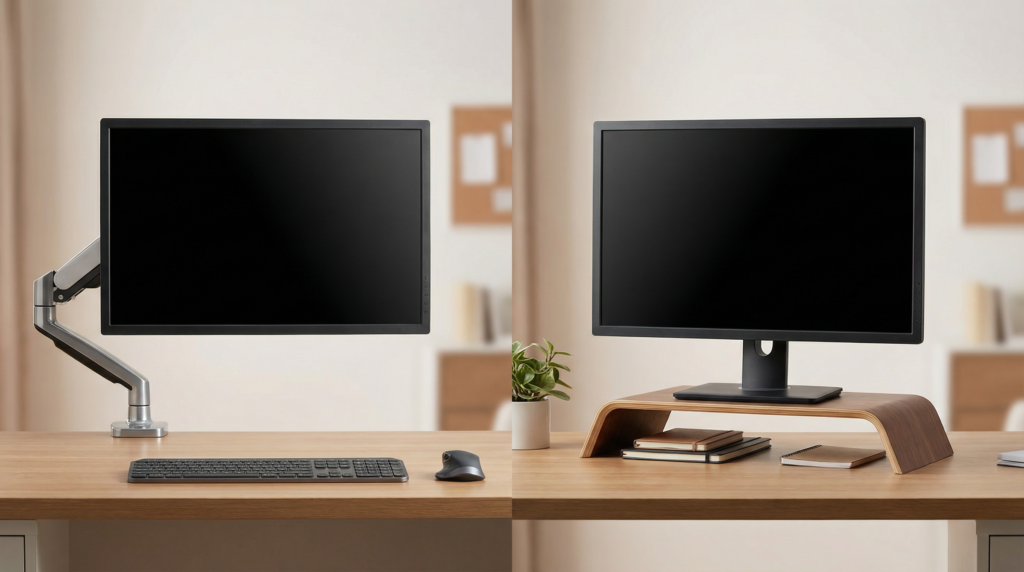
If you’re trying to improve your desk setup, a monitor arm and a monitor riser can both seem like smart upgrades. They solve a similar problem on the surface: getting your screen into a better position and making your workspace feel less cramped.
For most people, a monitor arm is the better choice because it gives you far more control over monitor height, distance, and angle. But a monitor riser still makes sense if you want something simple, affordable, and easy to set up without clamps, tools, or compatibility questions.
The Short Answer
A monitor arm is usually better if your main goal is ergonomics and flexibility. A monitor riser is better if you want a straightforward desk accessory that raises your screen and may add a little storage underneath.
Here’s the easiest way to think about it:
- Choose a monitor arm if you want better positioning, more usable desk space, or a setup that changes throughout the day.
- Choose a monitor riser if you want a lower-cost option, prefer a stable no-fuss setup, or don’t want to deal with mounting hardware.
What a Monitor Arm Does Better
Better ergonomics
The biggest advantage of a monitor arm is adjustability.
With an arm, you can usually move the screen:
- up or down
- closer or farther away
- left or right
- slightly tilted or rotated
That matters because a comfortable monitor position is not just about height. It’s also about viewing distance and angle. If your screen sits too far back, too low, or off-center, you may end up leaning forward, lifting your chin, or twisting a little all day without realizing it.
A monitor arm makes it much easier to place the screen where it actually belongs: generally with the top of the display around eye level and the screen about an arm’s length away, depending on monitor size and your vision needs.
More desk space where it counts
A monitor riser raises your screen, but it still takes up a footprint on the desk. A monitor arm lifts the display off the desktop entirely.
That’s a big deal on smaller desks, especially in:
- apartments
- dorm rooms
- shared home offices
- bedroom workstations
- narrow desks under 24 inches deep
Once the monitor is off the desk, you usually gain more room for a keyboard, notebook, speakers, charging dock, or just some breathing room in front of you.
Better for changing setups
A monitor arm makes more sense if:
- you switch between focused work and writing by hand
- you use a sit-stand desk
- you share the workspace with someone else
- you need to reposition your screen throughout the day
- you use dual monitors
In those cases, a fixed platform can feel limiting pretty quickly. A monitor arm lets the desk adapt to you instead of the other way around.
Where a Monitor Riser Wins
Simpler setup
A monitor riser is about as easy as desk accessories get. You place it on the desk, put the monitor on top, and you’re done.
That simplicity appeals to people who don’t want to:
- check weight limits
- confirm VESA compatibility
- clamp anything to the desk
- thread cables through an arm
- spend time adjusting tension
If you want a quick improvement without turning it into a project, a riser has real appeal.
Often more budget-friendly
In many cases, a basic monitor riser costs less than a decent monitor arm. That makes it a practical first upgrade for students, renters, or anyone improving a home office one piece at a time.
It can also be a better value if all you really need is a modest height boost. If your monitor stand already places the screen at a comfortable distance and angle, a riser may solve the problem without extra complexity.
Useful storage underneath
One of the underrated advantages of a monitor riser is the shelf space it creates.
Depending on the design, that space can hold:
- a keyboard when you’re done working
- a small laptop dock
- sticky notes and office supplies
- a slim notebook
- a compact external keyboard or mouse
That can help tidy up a desk, especially if you don’t have drawers. In a small-space setup, even a little vertical storage can make the surface feel more organized.
The Tradeoffs People Overlook
A monitor arm isn’t automatically the better pick
Monitor arms are excellent, but they’re not perfect for every desk.
Before buying one, you need to check a few things:
- whether your monitor supports VESA mounting
- whether the arm supports your monitor’s size and weight
- whether your desk has a sturdy edge for a clamp
- whether the desk surface is solid enough to handle the pressure
- whether there’s room behind the desk for the arm to move properly
If your desk is very flimsy, pressed against a wall with no clearance, or has an awkward edge design, an arm may be more trouble than it’s worth.
Some people also dislike even slight movement in the screen. A good arm should feel stable, but it usually won’t feel as locked-in as a monitor sitting on a solid stand or riser.
A monitor riser has ergonomic limits
A riser solves one part of the problem: height. It usually does not solve distance, reach, or angle.
That means a riser can fall short if:
- your monitor sits too far back
- the stand is bulky and wastes desk depth
- you need the screen closer to reduce leaning
- you want to center a monitor over a keyboard tray or laptop
- your posture changes throughout the day
In other words, a riser is helpful, but it’s far less flexible.
Which Is Better for Different Setups?
Best for small desks: Monitor arm
If your desk feels crowded, a monitor arm usually wins. It frees the most usable surface area and makes a compact workstation feel less boxed in.
This is especially helpful in city apartments or multi-use rooms where your desk may also serve as a vanity, dining nook, or side table after work.
Best for renters who want zero hassle: Monitor riser
If you don’t want to think about desk compatibility, installation, or marks from clamps, a monitor riser is the safer choice.
It’s also easy to move, store, or reuse in another room.
Best for ergonomics: Monitor arm
If you’ve been dealing with neck strain from looking slightly down all day or leaning in toward the screen, the arm is usually the better fix. It gives you the range to dial in a more comfortable position instead of just lifting the monitor a few inches.
Best for dual monitors: Monitor arm
Two monitors on two risers can eat up a lot of desk space. Dual monitor arms or two individual arms generally create a cleaner, more workable layout.
Best for simple organization: Monitor riser
If your main goal is tidiness rather than full ergonomic adjustment, a riser may be enough. It can create a neater visual line on the desk and give small accessories a home underneath.
Common Mistakes to Avoid
Buying a monitor arm without checking compatibility
Not every monitor works with every arm, and not every desk works well with a clamp. This is the most common mistake.
Choosing a riser based only on looks
A riser can look great and still be the wrong height. If it lifts the screen too much or too little, it won’t help much in daily use.
Ignoring desk depth
If your desk is shallow, the monitor base itself may be part of the problem. In that case, a riser may raise the monitor but still leave it too far back or too bulky. A monitor arm usually solves this better.
Forgetting how you actually work
If you mostly sit in one position and want cleaner storage, a riser may be plenty. If you move around, switch tasks, or constantly nudge your monitor into place, you’ll probably appreciate an arm more over time.
Final Verdict
In the monitor arm vs. monitor riser debate, the better option for most people is the monitor arm. It offers better ergonomics, saves more desk space, and adapts more easily to real-life work habits.
A monitor riser is still a smart buy if you want something affordable, stable, and easy to use right away. It’s especially practical for a fixed setup where your monitor already sits at a decent distance and only needs a bit more height.
Conclusion
If you want the most comfortable and flexible setup, go with a monitor arm. If you want the simplest upgrade with the least effort, choose a monitor riser. The right pick comes down to whether you value adjustability or simplicity more, but for long-term comfort, the monitor arm usually comes out ahead.